
Find the hidden fees and forgotten subscriptions draining your accounts
Expense Canary checks all your linked banks and cards for hidden fees, subscriptions you forgot about and unusual charges. Read-only through Plaid, so it cannot move money.
Available in the US and Canada
Read-only bank connection through Plaid. We never move your money.
7-day free Premium, then $4.99 USD/month. Cancel anytime. US and Canada.
Read-only bank access through Plaid. We never receive your bank login.
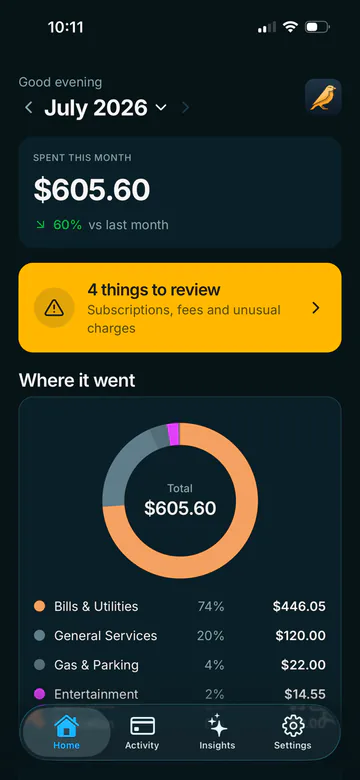
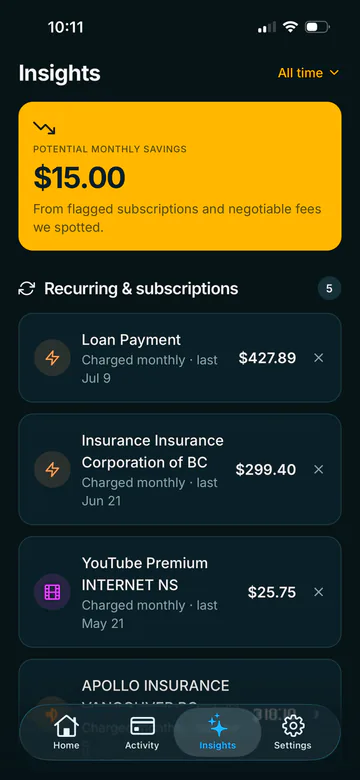
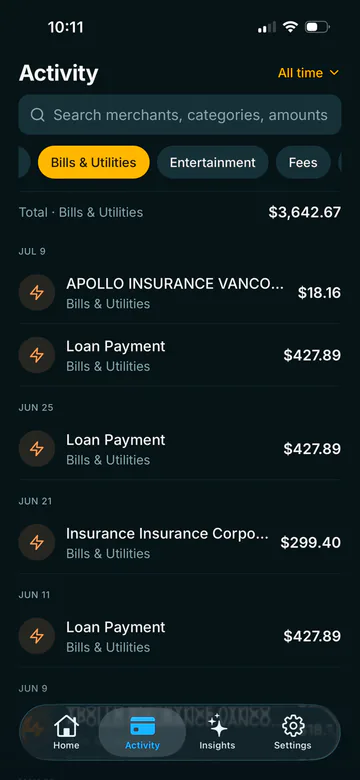
Real screens from the Expense Canary iPhone app.
Your accounts and recurring charges in one place.
Review transactions, subscriptions, and bank charges in a clear view.
Hidden Fee Alerts
Review maintenance fees, overdraft charges, and unfamiliar debits.
Subscription Radar
Review recurring charges and subscriptions together in one list.
Anomaly Detection
Flags unusual and duplicate charges so you can check them before they add up.
Multi-Bank View
View transactions from connected chequing, savings, and credit card accounts together.
Auto-Categorization
Transactions are organized by category to make spending easier to review.
Spending Insights
Review category breakdowns and compare spending over time.
How it works
Connect your bank
Connect read-only through Plaid. We never receive your bank login and cannot move money.
Find money leaks
See hidden fees, forgotten subscriptions and unusual charges across all your accounts. You also get a heads up when something new looks off.
Review subscriptions
See every subscription in one list.
Read-only bank connections
Connect your bank through Plaid to review transactions and recurring charges. Expense Canary cannot move money.
- Your bank login is never shared with Expense Canary
- Connections are provided through Plaid
- Access is read-only
Local pricing may vary.
Subscription is managed through the App Store or Google Play.
Available in the US and Canada
Subscription managed through your app store
Guides
Practical help for reviewing subscriptions and bank charges.
How to find forgotten subscriptions in Canada
Find subscriptions still charging your Canadian bank and credit card accounts, check Apple, Google Play and PayPal, and stop credit card charges and pre-authorized debits the right way.
Read guideThe best apps to track subscriptions across banks in the US
Seven apps that link your US banks and cards and find subscriptions for you, with prices checked Nov 17, 2026 and one honest drawback each, including ours.
Read guideHow to see every recurring charge from all your banks, without a budget app
One list of every subscription and recurring charge across all your banks and cards, with no budget to keep. Compare the options in the US and Canada.
Read guideA YNAB alternative when you want to catch leaks, not keep a budget
Compare YNAB with a simpler option for catching hidden bank fees and forgotten subscriptions across your linked banks.
Read guideHow to cancel PocketGuard Plus
Cancel PocketGuard Plus in the app, on the web, or through Apple or Google Play, then keep watching for forgotten subscriptions and hidden fees.
Read guideHow to cancel Monarch Money
Cancel Monarch Money on the web, App Store, or Google Play, then keep watching for forgotten subscriptions and hidden fees.
Read guideHow to find forgotten subscriptions
Check statements, app store renewals, and email receipts, then keep recurring charges visible.
Read guideHow to spot duplicate charges on your bank account
Compare pending and posted transactions and learn when to contact your bank or card issuer.
Read guideA Rocket Money alternative that works in Canada
Review how Expense Canary connects supported US and Canadian banks through Plaid with read-only access.
Read guideIdentify an unknown charge on your bank statement
Decode confusing merchant names, check holds and app store billing, and know what to do when a charge is not yours.
Read guideThe best subscription tracker apps in Canada
Compare the options that work for Canadians, what each one does well, and who it suits.
Read guideA Copilot Money alternative for Android and Canada
Expense Canary is a simpler option focused on one job: telling you when a new or duplicate charge shows up, and keeping your subscriptions in one list.
Read guideA Monarch Money alternative for finding money leaks
If you do not want a full budget but do want to catch hidden fees, forgotten subscriptions and unusual charges across your banks, Expense Canary is a narrower, lower priced tool.
Read guideHow to cancel Rocket Money Premium
Official steps to cancel Rocket Money Premium in the app or on the web, plus what to watch for after you leave.
Read guideA PocketGuard alternative when you want leaks, not a full budget
If you want a subscription leak finder instead of another full budgeting dashboard, Expense Canary is a simpler option. 7-day free Premium, then $4.99 USD/month.
Read guideHow to catch free trials that turned into paid plans
Scan statements, app stores, and email for converted trials, then keep forgotten subscriptions still charging visible across your banks.
Read guideHow to cancel Copilot Money
Cancel through Apple or Copilot's settings, understand refunds, and keep watching for money leaks after you leave.
Read guideHidden bank fees: how to spot them and get them waived
Find maintenance, overdraft, NSF and other fees across your accounts, then ask your bank about a waiver.
Read guideA SubMonitor alternative when you want more than a subscription list
Expense Canary catches money leaks: hidden fees, forgotten subscriptions and unusual charges across all your linked accounts.
Read guideHow to cancel Amazon Prime in Canada
Go to Manage Prime Membership on amazon.ca and select End Membership (or Do Not Continue on a free trial).
Read guideHow to cancel Amazon Prime in the US
Cancel Amazon Prime on amazon.com, check the current US price and refund rules, and see what happens to Prime Video channels after Prime ends.
Read guideHow to cancel YouTube Premium
Cancel YouTube Premium or YouTube Music Premium on a computer, iPhone or Google Play, or pause for 1 to 6 months when YouTube offers it.
Read guideHow to cancel an Adobe subscription
Cancel a Creative Cloud, Acrobat or other Adobe plan in your Adobe account, see the 14 day refund window, and check whether an early cancellation fee applies.
Read guideWhat is AMZN Mktp on your bank statement?
AMZN Mktp US is an Amazon.com purchase on your statement. Match it in Your Transactions, and tell it apart from Prime, Amazon Pay and pending authorizations.
Read guideHow to cancel YNAB
To cancel YNAB, open the YNAB web app, click your plan name at the top of the left sidebar, choose Account Settings and click Cancel Subscription.
Read guideHow to avoid overdraft and NSF fees
In the US, your bank cannot charge an overdraft fee on an ATM withdrawal or a one time debit card purchase unless you opted in.
Read guideHow to cancel Spotify Premium in Canada
Cancel Spotify Premium on your account page, check who bills you, then keep watching for forgotten subscriptions and hidden fees.
Read guideHow to cancel Crave in Canada
Cancel Crave on crave.ca or with whoever bills you, avoid paying twice, then keep watching for forgotten subscriptions and hidden fees.
Read guideHow to cancel Netflix in Canada
Cancel Netflix in your account or with whoever bills you, avoid paying twice, then keep watching for forgotten subscriptions and hidden fees.
Read guideHow to cancel Disney+ in Canada
Cancel Disney+ in your account or with whoever bills you, like Apple, Google, Bell or Crave, then keep watching for forgotten subscriptions and hidden fees.
Read guideHow to cancel Apple subscriptions in Canada
Cancel subscriptions billed by Apple on iPhone, Mac, Windows or the web, find the ones you can't see, then keep watching for forgotten subscriptions and hidden fees.
Read guideFrequently asked questions
Quick answers about access, supported institutions, and Premium.
Why pay for a subscription to find subscriptions?
Can't I just log in to each bank and check?
Is it safe? Is it read-only?
Which banks are supported?
What does Premium cost?
Find out what your accounts are quietly charging you.
7-day free Premium, then $4.99 USD/month.
Available in the US and Canada